Archive for the ‘General’ Category
Business seasonality, and search trends for your marketing
Chances are if you are an online retailer your have some seasonality to your business. This mainly depends on the type of products you sell, and the general type of people that purchase your products. As a B2B’ish industry we see major volume decreases near every holiday.
Where does your business fit-in?
The once a year rush…
The every holiday surge…
The B2B…
Or the product launch…
With Google’s and others’ free tools on the internet, a small business owner can get very good insight into business seasonality, and shopping search trends. If you have good relationships with your suppliers and manufacturers, it’s often possible to design pre-release campaigns for upcoming products. Search engines place some weight on the first websites to write about specific products or services. If you’re that website, you can gain considerable traction in natural search rankings, and possibly a huge sales boost once the product is launched. This is just one example of how trends like this can be used, but the possibilities are endless and the data is free.
Having a SUNny day without Microsoft
If you’re another person who is constantly fed up with Microsoft products and the cost that comes with them, you’re not alone. I still stand by my recommendation of avoiding Microsoft products before you become their slave, but I must admit, there’s still a number of them that I use.
 Since I wrote that article about 2 years ago, not much has changed with Microsoft. I will say that their new online version of Office looks to be a vast improvement over Google docs or any other online based office software. Nevertheless, I think it’s time to take a serious look at dumping Microsoft for SUN. Microsoft’s 3 year Vista, Windows 7, XP saga has been nothing short of exhausting, and may very well be a fatal blow to Microsoft’s reputation.
SUN is emerging as a driving force behind free and Open Source software development, and I think that most businesses could thrive exclusively on SUN software and services. Besides the core Java programming language, let’s take a look at the free and open source products that SUN is supporting.
Framework for a Good Product Page
I was inspired by the Anatomy of a Usable Website, and decided to make a similar guide for a product page. I had previously written a post regarding product descriptions, which still apply here as well.
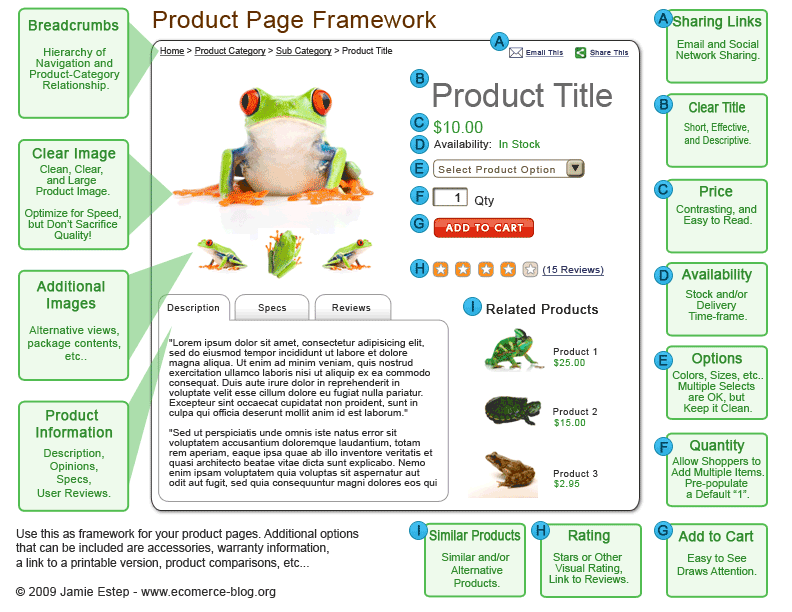
Download the full PDF version »
This is meant to be a framework for creating an ecommerce product page. There are of course many additional things that could be put on a product page, but these are the essentials that every page should have. The more features that a product page has, the more likely a user won’t notice them.
In the end, websites benefit from clean and well organized content.
Could your ecommerce site kill somebody
I was recently looking at Google Maps for some route information to find a driving time near my hometown in Colorado.
Google Suggested that I drive over a pass called Schofield pass. While this could be just any old pass, but it’s not.
Schofield Pass is one of the most dangerous roads in Colorado. It is a 7ft wide rocky mess of a trail with a 500ft cliff on one side and a solid rock wall on the other. It has been called the most dangerous pass in Colorado, and boasts a near-vertical 27% grade in some places. Over 20 people have perished on it in past 30 years. Just a few months ago we saw an abandoned Suburban on it, who’s owner thought it safer to forget about his vehicle than to risk the descent. Until cleaned up in the recent years, the river below was littered with the remains of Jeeps, and Trucks that didn’t make it. Oh, and going up is 100x harder than going down, which is what Google Maps was suggesting.
Here’s a Youtube Video that shows very well, just how bad Schofield Pass pass is. And yes, this is a “road” that people drive Jeeps of 4wd’s over.
So I got to thinking, how many similar passes in Colorado could Google be suggesting people to use. I found an additional 2, very dangerous passes, in about 5 minutes of looking.
Pearl Pass is the first, and Ophir Pass is the second.
Just a small section of Pearl Pass:
Ophir pass is the easiest:
Now all of these routes are in somewhat obscure locations, but the areas that surround them are visited by millions of tourists every year. It would be extremely easy for someone to pull up directions for a scenic drive on google maps, and … Someone actually tried to drive Schofield in an 18 wheeler some time ago.
So if you are a software, information, or anything else company, it may be a good idea to make sure your program isn’t gearing up to kill somebody. Based on the usage, I would bet that Google Maps has already done so somewhere!
Multi process PHP execution
Moved to: http://www.saynotoflash.com/archives/multi-process-php-execution/
The biggest sites make simple mistakes
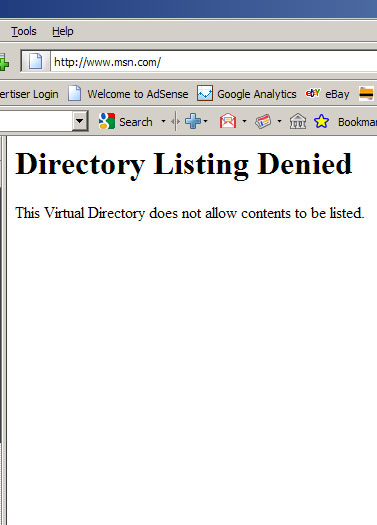
Google messed everything up a few months ago. MSN’s done it now. Mistakes like either of these are completely unacceptable. Make sure you always understand what the affects of your actions are before you go and make changes that break everything. A little attention to detail could have prevented both of these.
Getting control of your DNS
DNS is one of those things that everybody uses and nobody thinks about. We all just assume that when we type our website in the address bar and it comes up, then everything is OK.
In reality, the way your business’s DNS is handled can be a gift or a curse. I can’t think of a technology that has been under more security scrutiny lately than DNS. Years after our typical DNS system was thought to be safe, huge exploits have been found having the potential to wreak havoc on large portions of the internet.
Green up your IT
There’s a lot of talk about green IT, and most of it out there is just a glorified marketing pitch. One thing we all need to keep in mind, is that manufacturing new equipment, whether green or not, is much more wasteful than keeping existing equipment going (with a few exceptions).
Let’s face it, as a business owner most of us would love to have a green IT, but most of us aren’t willing to sacrifice performance or cost, at the expense of being green. Buying a $75 power strip that saves $3.00 per year in energy costs, isn’t a smart buy, no matter how many magazines say it is so.
Forget ROHS, Energy Star, and everything else. Here’s how to green up your IT…
1.) Buy used equipment
 When you need to buy computer equipment, try to look for used or refurbished equipment before buying new.
New computers and IT equipment are generally much less power consuming than older equipment. However, buying used equipment reduces the load on landfills and reduces the emissions and waste from manufacturing more equipment.
The best way to reduce waste is to not create more!
You probably won’t find any computer manufacturer recommending this any time soon, because they want you to shell out for new (& more expensive) equipment. Manufacturers have been making efficient equipment for at least five years. You can find plenty of great IT equipment on eBay for a fraction of the cost of new.
If you still have some old mainframe computer using up a megawatt of electricity per month, it may be time to upgrade…
2.) When buying any equipment, buy what you need, not what you want
 The thing about those personal super computers with forty processors, quad-graphics cards, and 200 gigabytes of RAM, is that they require a lot of power to run.
Most of the time, you don’t need high-end equipment for running Office and an email program. Get the most minimal computers and equipment that you can get by with, also calculating for future usage so you don’t need to upgrade.
Video cards are one of the most effective places to downgrade. You don’t need a monster graphics card to view 2D text and pictures. A puny 16Mb card can do this fine. Skip the SLI, Crossfire, 512 MB DDR3 cards and get something small and efficient
3.) Consolidate equipment
A server for email, a server for files, a server for the database, a server for the website, a server for backups, etc…
This is the all-too-common setup that I see businesses use. While there’s a point to segmenting for security and operational independence, many times these servers can be consolidated into a few. It also costs more to manage and maintain multiple servers and computers, so reducing the total number is appealing on multiple fronts.
One or two very good servers is usually cheaper to maintain and more energy efficient than five mediocre servers. Using virtualization, you can often get all of your servers running securely on a single machine.
For a small business, I personally like to put the web, intranet and email servers all on a single machine, and then the internal file server, domain controller, and internal application server on a separate machine. This provides good segmentation, and is easy to manage and understand.
4.) Buy UPS (uninterruptible power supply / battery backup) devices for your equipment
The best surge protector is rarely as good as a cheap UPS device. These will protect your equipment from surges, and shut them down if there is a loss power. Keeping equipment out of the trash is the best way to stay green.
Power outages kill computer equipment, especially servers, even if there isn’t a surge that goes with it. You can buy UPS devices used, and replace the batteries when they get exhausted. They can save thousands on IT costs and troubleshooting from losing equipment. APC is probably the leader in UPS devices. Just make sure that you can replace the batteries before buying one.
Don’t even consider operating good computer equipment without a decent UPS to go with it. These will truly save money and time in the long run.
5.) Stop the paper
 We all have email, and there are hundreds of scanners that can put paper into a usable PDF or text document. At this point, there is very little reason not to stop using paper. Legal documents are one thing, but for everything else, print it to a PDF, and email it.
You can save your business thousands per year in paper and ink costs by converting to electronic documents.
At one point we were using over 60,000 pages per month just in personal printing. After switching to scanning and PDF printing, it was reduced to under 5,000.
You will have some employees fighting this to the death, but in the end there is no doubt that it is worth the time and effort to get everyone using electronic only documents.
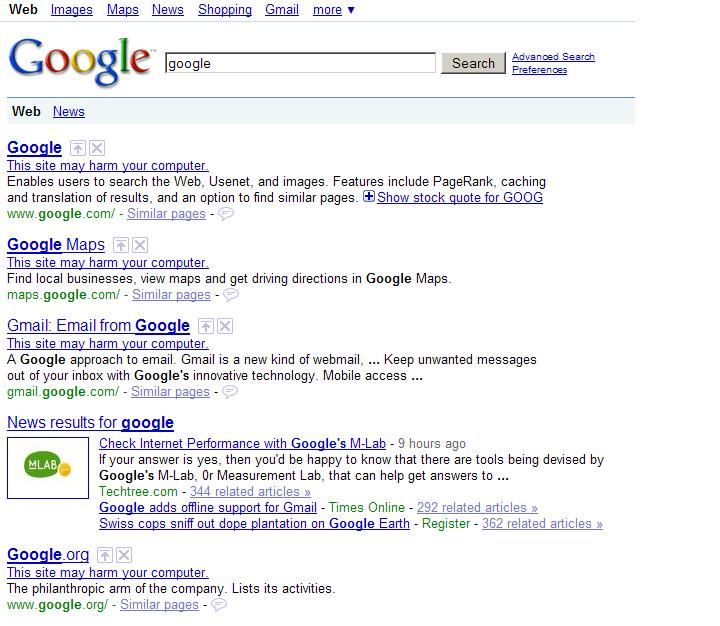
Google Search Results Completely Broken
This site may harm your computer, is attached to every search result in google’s index. Looks like google thinks everything is Spam even their own websites.
If you look, all of the cached results are also removed. Something is definitely broke at the old Google.
Has Amazon has become the Walmart of the Internet?
Amazon.com runs one of the most successful and dominating online businesses in the history of the internet. But, if you’re smart, you wont use them as an ecommerce platform. Here’s why:
- Amazon is competing against you!
- Amazon will become a better solution than you!
- Amazon will eventually kill you for your market!
- Amazon is going to hold your hand while they drown you!
- Amazon is hurting everyone else!
1.) Amazon is competing against you!
First and foremost, using Amazon stores to launch your own ecommerce venture puts you in direct competition to one of the fiercest online competitors you will ever encounter. It’s unlikely that you can compete with them on price and shipping options and still make a profit. Since you’re at the mercy of their system, customer support and uniqueness are just an afterthought.
Amazon has a number of reasons for customers to shop directly through them and not through an Amazon store. By driving traffic to your Amazon store, you “will” lose sales directly to them. What’s even more ironic, is that you’re paying them to steal your business!
2.) Amazon will become a better solution than you!
Amazon offer the best return policies, the best shipping prices, and the largest selection of products of any place (less eBay) on the entire internet. With a prime account, I get free 2 Day shipping and $3.99 overnight shipping on everything! I can buy servers (~60lbs each), and save over $500 in shipping charges on only a few servers vs buying from you. I can buy kitchenware, clothes, camping gear, and computers, all with free shipping, all at the same time. Why would I buy from your store instead of Amazon.
3.) Amazon will eventually kill you for the market you created!
Amazon uses their customer’s data, information about product conversions, selling prices, user demographics, and everything else they have access to. Once they have enough statistics, they find lower priced wholesalers or take a loss leader, and start selling the same products as yours. If you reach this point, refer to 1 and 2!
4.) Amazon is going to hold your hand while they drown you!
Through this entire process, Amazon is going to act like your best friend, right up until the point where they bury the steak. I recently talked to a number of former online businesses that suffered this exact above scenario. Only one of several I talked to remains in business, although no longer through Amazon. One of the others had a solid foundation built exclusively on Amazon’s platform for several years. Her along with most of those stores went down being under-priced out of business.
5.) Amazon is hurting everyone else!
Now you can always say that Amazon has the right to sell whatever they want. You’re absolutely right. But allowing them to launch their new sales campaigns based on your data, products, categories, the product reviews that you’ve built up, and hours of your own labor, is a good way to put yourself out of business. It’s no wonder that Amazon is just about the only online retailing company in the entire world that’s still growing rapidly. They’re using their customer’s hard work to launch a blitzkrieg campaign, charging them to do so, putting their own products ahead of all others, and leaving a swath of destruction in their wake.
Now is not the time to sacrifice yourself, or even shop, at Amazon (Walmart of the Internet)! Now is the time to shop at local stores, at local businesses, and small niche websites that represent their retail counterparts. It’s time we all look out for each other and not some shareholders.